
8557 deposit Guide for Users in Pakistan
Before pressing a deposit button, you need to understand the payment method, selected channel, and amount being requested. That matters even when the page looks familiar. A completed wallet payment and an updated gaming balance are two details to check, and your receipt helps you follow both.
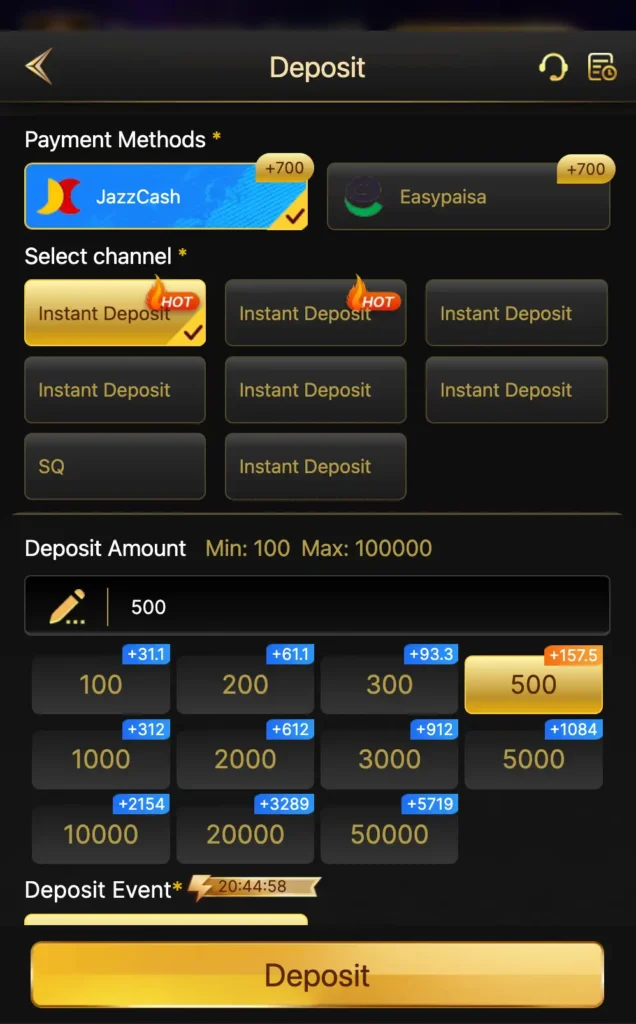
The reference screen shows JazzCash and Easypaisa, several channel choices, and buttons for selecting an amount. This guide explains those controls and the checks to make before approving a payment. It also covers displayed limits, offer conditions, and delayed transactions. Keep the current payment instructions open as you work through the form. Before an 8557 deposit, confirm that the transaction is permitted under local rules and the providers’ terms, and protect the money you need for everyday expenses.
Payment Methods Shown on the Page
JazzCash and Easypaisa appear in the supplied 8557 game screenshot. Their appearance does not establish an approved partnership or confirm that either provider permits a particular transaction.
- JazzCash: Check its availability in the current checkout and review the payment details.
- Easypaisa: Read the selected method’s instructions and confirm the wallet account being used.
An 8557 deposit should follow current, permitted payment instructions, with the recipient and amount checked before approval.

What to Check Before Continuing
Prepare a few details first:
- Confirm the account through your usual 8557 login.
- Check your wallet balance and applicable charges.
- Read the payment channel’s instructions.
- Review the amount and currency.
If you arrived through a search for 855, 8556, 855 7, or 857, check the full provider name. A familiar 8557 app icon or an 8557 APK filename does not verify a payment destination.
How to Make an 8557 deposit in Six Steps
The screenshot shows the deposit form, but not the later checkout screens. Follow the actual instructions presented by the current service.
Step 1: Open Deposit
Sign in to the verified service and open Deposit. Check that you are using the intended gaming account.
Step 2: Choose a Payment Method
Select a currently available method only after confirming that the transaction is allowed. Read any method-specific requirements.
Step 3: Review the Channel
Select a channel and read its instructions. A Hot badge or Instant Deposit label does not establish processing speed.
Step 4: Enter the Amount
Review the 8557 deposit amount, currency, and any charges. Check the value again if you used a preset button.
Step 5: Inspect the Checkout Details
Tap Deposit to review the next screen. Confirm the recipient and total; stop if anything differs from the expected instructions.
Step 6: Approve and Keep the Receipt
Authorize a permitted payment through the genuine wallet payment flow. Save the transaction record and check both the wallet status and gaming balance.
Features of the Deposit Form
The pictured payment layout includes controls that help you review your selection. Check their values before moving to payment.
Preset Amount Buttons
Preset buttons on the 8557 deposit form display ready-made amounts. Selecting one should still be followed by a check of the editable amount field.
Separate Channel Choices
The page displays multiple channel tiles under the payment methods. Read the selected channel’s terms instead of assuming all options work identically.
Deposit Event Area
An event section with a timer appears below the amount choices. Read its conditions before deciding whether to accept an 8557 Game associated offer.
Understanding Minimums, Maximums, and Fees
The reference screen lists a minimum of 100 and a maximum of 100000 beside the amount field. These are snapshot values; confirm the current limits and currency before paying.
Your wallet has its own limits too. JazzCash states that transfer limits vary by account verification tier. A gaming page’s displayed maximum does not override those limits. IBFT Transfer Pakistan
Before an 8557 deposit, check whether any fee changes the amount deducted or credited. Do not assume a displayed promotion covers payment charges.
What to Check After Payment
Keep the transaction reference, payment time, amount, recipient, and status. Store the receipt privately so you can provide relevant details if a query becomes necessary.
Compare the wallet record with the gaming balance after your 8557 deposit. If the wallet reports completion but the account remains unchanged, raise a query using the original transaction reference. A second payment can create another debit without explaining the first one.
Common 8557 Game Deposit Problems and Solutions
The Amount Is Rejected
Review the current minimum, maximum, wallet balance, and any transfer limits. Check whether charges require additional available funds.
The Payment Remains Pending
Check the original transaction status before retrying an 8557 deposit. Follow any stated waiting period and contact the relevant provider if it continues.
Money Is Debited, but Credit Is Missing
Keep the wallet receipt and contact the gaming service through its verified support channel. Provide the reference and amount without exposing security codes.
The Recipient Looks Wrong
Stop before approval. If payment has already occurred, contact your wallet provider promptly; reversal or refund options depend on the transaction and provider rules.
Read Deposit Offer Conditions
The screenshot includes promotional labels beside payment methods and amounts. They do not establish current eligibility or prove that a reward will be credited.
Before accepting an 8557 deposit offer, look for conditions covering eligible channels, qualifying amounts, reward timing, wagering requirements, and withdrawal restrictions. Ask verified support about unclear terms. A countdown should not decide how much money you spend.
Protect Your Wallet Information
Keep your wallet PIN, account password, and verification codes private. JazzCash’s official safety notice states that it will not ask for your PIN, OTP, or password. Mobile Wallet & Online Bill Payment
During an 8557 deposit, use the genuine provider’s authorization flow. Hide unrelated account details in receipts shared with support, and avoid sending payment information to contacts found in unsolicited messages.
Pros and Cons of the Deposit Layout
Pros
- Payment method choices are visible.
- Amount entry and preset buttons are shown.
- Minimum and maximum values appear together.
Cons
- Later checkout details are not shown.
- Current provider approval is unverified.
- Offers require separate condition checks.
Final Thoughts
An 8557 deposit needs accurate details and a clear payment record. Check eligibility and local rules first. If you fund casino games, Teen Patti, or slots, set a spending limit and protect money needed for essentials. Real-money play can lead to losses.
Frequently Asked Questions
Which Payment Methods Are Shown?
The supplied screen displays JazzCash and Easypaisa. Confirm current availability and permitted use before paying.
Is Every 8557 Game Deposit Instant?
The Instant Deposit label does not confirm a processing time. Check the selected channel’s current terms and transaction status.
What Is the Minimum Amount?
The screenshot shows 100. Check the current minimum, currency, and wallet requirements before using that figure.
Should I Pay Again While a Transaction Is Pending?
Resolve the original 8557 deposit first. Another payment may cause a duplicate debit.
Does a Deposit Guarantee a Bonus?
No reward is established by this guide. Review the current promotion’s eligibility and crediting conditions separately.